Speedometer
PeaceAuto & Vehicles
4.3413.00 Reviews
- Version
- 2.0.0
- Installs
- 100.00K
- Age Rating
- Everyone
Screenshots
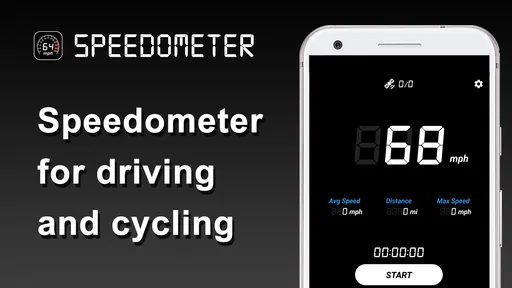
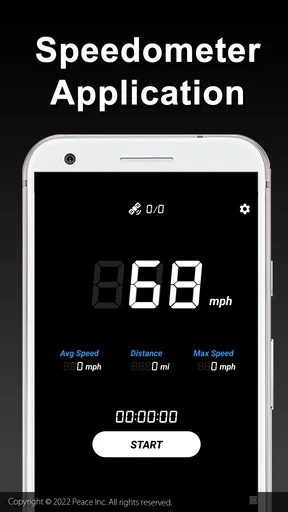
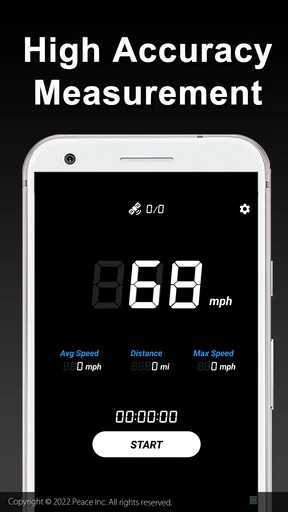
Our Review of Speedometer
 Analysis by Appyee
I often find a simple speed readout useful for checking how quickly I’m moving without digging through a full navigation or fitness app. Speedometer is built around that one job, so it makes the most sense when I want a quick glance at speed rather than a broader travel log. It’s a free Auto & Vehicles app from Peace, rated for Everyone, and its straightforward purpose is easy to understand before you open it.
A focused tool rather than a full travel app
The current version is 1.5.0, and the app has been available since September 24, 2022. That tells me it has had time to settle into a clear, modest role: turn a phone into a speed display. It has an average rating of 4.4 from around 1,500 ratings, and more than 100,000 installs. Those figures suggest it has found an audience, but they don’t tell me whether it will suit every phone, route, or activity.
That distinction matters because a phone-based speedometer is not the same thing as a dedicated vehicle instrument. It can be handy for checking movement, but its usefulness depends on the phone being able to get a good GPS signal and on the device being positioned where you can see it safely. I’d treat it as a convenient reference, not as a replacement for a car’s dashboard or a trusted navigation system.
Where a phone speed readout earns its place
I can see this being most useful for someone who wants a simple speed check while cycling, running, or travelling as a passenger. For a driver, the sensible use is to set the phone up before moving and glance only when it is safe; handling or watching a phone while driving is not worth the risk. For a runner or cyclist, it can offer a quick sense of pace without the extra screens and account features that often come with a dedicated training app.
It also helps to know what question you want the app to answer. If you only want to see your current speed, a compact speedometer can be quicker to open than a navigation app. If you want route guidance, saved workouts, maps, or detailed performance history, a navigation or fitness app is a better fit. I like the focused approach, but it does mean this should not be mistaken for an all-purpose trip companion.
A Handy Tool in Your Pocket
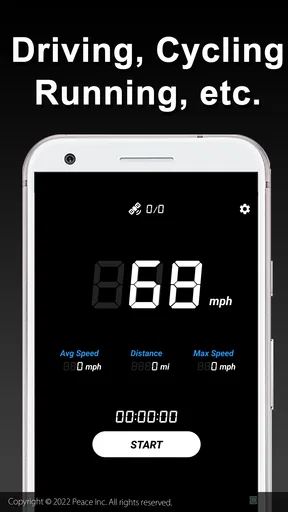
Speedometer turns your smartphone into a fully functional speed tracking device. It's like having a mini dashboard right in your pocket. The app is designed to use GPS tracking to provide real-time speed readouts, which is super handy whether you're driving, cycling, or just out for a run. And let me tell you, it’s pretty nifty to see your current speed pop up right there on your phone screen.
Getting Started with Speedometer
Setting up the app is a breeze. After downloading it from the app store, you’re greeted with a simple interface that’s incredibly user-friendly. You don’t need a PhD in technology to get started. Just fire it up, make sure your GPS is enabled, and you’re good to go. The app immediately starts tracking your speed, and you’ll see the numbers update as you move.
Features That Stand Out
One of the first things I noticed was the clean and minimalist design of the app. There aren’t a bunch of unnecessary features crammed in, which I appreciate. Here’s what I found most appealing:
- Real-time Speed Tracking: The speed readout is large and easy to read, even if you’re glancing at it quickly.
- Odometer Functionality: This is a cool addition that tracks the total distance you’ve traveled. Perfect for tracking your daily runs or bike rides.
- Speed Limit Alerts: You can set speed limits, and the app will alert you if you go over them. This is especially useful for drivers wanting to avoid those pesky speeding tickets.
- Units of Measurement: Whether you’re a miles-per-hour or kilometers-per-hour kind of person, Speedometer has you covered.
Making the readout useful day to day
The most helpful routine is to open the app while stationary, confirm that the speed unit makes sense for you, and wait until the phone has a stable location signal before judging the number. GPS-based readings may take a moment to settle after you start moving, and an early reading can be less useful than one observed after the signal has stabilized. I would not use a single brief fluctuation to decide whether a vehicle’s instrument is wrong.
For a familiar commute, the odometer can add context to a speed check by showing distance travelled, but I would avoid treating a phone readout as a carefully maintained trip record. If you need consistent mileage for expenses, training analysis, or a work log, use a purpose-built tracking workflow and check what it saves. The practical advantage here is immediacy: open the app, look at the current reading, then put the phone away.
A realistic example is a cyclist testing a new route on a quiet path. Before setting off, they can choose the display unit and secure the phone where it remains visible without taking attention away from the path. A quick glance during a safe pause can answer whether a gentle downhill is carrying them faster than expected. That’s a better use than repeatedly checking the screen while navigating traffic, where the distraction outweighs the benefit.
Accuracy, placement, and sensible expectations
The reading depends on GPS conditions, so an open stretch is a fairer place to assess it than a covered car park, a tunnel, or a route surrounded by tall buildings. When the signal is weak, the displayed speed may lag or jump; that is a limitation of relying on a phone’s location signal, not a reason to assume every number is precise. I’d compare it over a steady stretch rather than react to momentary changes.
Phone placement also affects whether the app is useful in practice. A screen that is easy to see from a safe mount may be convenient, while a phone loose in a pocket is not a good way to monitor speed continuously. For a car, the built-in speedometer remains the safer and more appropriate reference. For cycling and running, a watch or dedicated cycling computer may be preferable if you need hands-free viewing, robust mounting, or broader training records.
Speed alerts can be useful as a reminder, but I would not rely on them as a guarantee against speeding. GPS readings can differ from a vehicle’s instrument, and an alert is only helpful if the phone is positioned safely and the signal is behaving well. Set a conservative limit if you use the feature, keep your attention on the road, and follow posted limits rather than treating an app notification as permission to drive at a particular speed.
What the price and audience mean in practice
The app is free to download, with in-app purchases listed at about ten dollars per item. That makes it easy to try the basic experience before deciding whether anything paid is relevant to you. I would check the purchase details in the app before confirming one, especially if all you need is an occasional speed reading. For that narrow use, the free entry point is a practical way to see whether the display and GPS behaviour work well on your device.
Its Everyone age rating fits a utility that presents speed information, though the way it is used still matters. I would recommend it to someone who wants a direct readout for a walk, jog, bike ride, or occasional comparison while travelling. I’d steer away from it if you need turn-by-turn navigation, reliable professional measurement, detailed workout analysis, or a hands-free instrument designed for continuous use. Those jobs call for a more specialized device or app.
Real-World Usage
I tested the app during a weekend road trip and a daily jogging session, and it worked like a charm in both scenarios. On the road, I liked being able to compare the app’s speed readout with my car’s dashboard, and surprisingly, they were in sync. During my run, it was motivating to see my speed fluctuate as I pushed myself harder.
One thing to keep in mind is that the app’s accuracy heavily relies on a good GPS signal. If you’re in an area with spotty reception, you might see some discrepancies. But in urban areas and open roads, it’s pretty spot-on.
What to keep in mind as you choose
For people already using a navigation app, the choice is mostly about convenience. Navigation software can show speed alongside maps and directions, which is better when you need to know where to go. A fitness app is more appropriate when the goal is to review a workout, while a dedicated speed display or vehicle instrument is better for frequent, glanceable use. This app’s appeal is that it stays centered on the number rather than asking you to manage a larger system.
Peace’s release history and the current version give useful context, but I would separate that from assumptions about what comes next. The version number confirms the build you can install now; it does not, by itself, tell me what features may be added later. Existing users should judge an update by whether it continues to provide a clear reading on their own device and routes, rather than expecting an unannounced change to solve GPS limitations.
If you already have it installed, a sensible check is to test it in the same open location where you normally travel, with the phone held or mounted securely and the unit set correctly. That gives you a more meaningful comparison over time than switching locations and conditions between checks. If you are deciding whether to keep it, ask whether you actually need quick speed visibility; if your real need is route history or training feedback, the extra focus may feel restrictive rather than refreshingly simple.
Wrapping Up
Overall, Speedometer is a reliable and straightforward app that does exactly what it promises. It’s not bogged down with unnecessary bells and whistles, which makes it perfect for someone who just wants to track their speed without any fuss. Whether you’re a cyclist, runner, or driver, this app is worth giving a shot.
If you’re curious to see how fast you’re really moving, go ahead and download it. You might just find it’s one of your new favorite tools!
Verdict
Strengths of Speedometer
- Accurate speed tracking for vehicles.
- User-friendly interface with clear visuals.
- Customizable settings for alerts and units.
- Works offline with GPS support.
- Minimal battery consumption during use.
Limitations of Speedometer
- Limited support for non-vehicle activities.
- Ads can be intrusive at times.
- Requires GPS for accurate readings.
- No integration with fitness apps.
- Paid features locked behind paywall.
Similar Picks in This Category
View All
Android Auto
Google LLC4.1

maxim — order a taxi & food
PT. SITO4.7

Штрафы ГИБДД: проверка с фото
Pays LLC – Штрафы ГИБДД4.7

Номерограм – проверка авто
Авто Ассист4.8

Дром Авто
Дром4.9

Frequently Asked Questions
What features does the Speedometer app offer?
The Speedometer app provides real-time speed tracking, average speed calculation, and maximum speed alerts. It also includes a GPS-based odometer, trip history, and a customizable interface. Users can choose between digital and analog displays and set speed limits to receive notifications when they exceed them.
Is the Speedometer app accurate and reliable?
Yes, the Speedometer app uses GPS technology to provide accurate and reliable speed measurements. However, accuracy may vary depending on GPS signal strength and environmental conditions. It's recommended to use the app in open areas for the best results and to cross-verify readings with your vehicle’s speedometer.
Does the Speedometer app require an internet connection?
While the Speedometer app primarily relies on GPS, it does not require an active internet connection for basic speed tracking. However, some features like map integration and real-time traffic updates may need internet access. Users can enjoy core functionalities offline, ensuring convenience in remote areas.
Can I use the Speedometer app while driving?
Yes, the Speedometer app is designed to be used while driving, providing speed alerts and trip details. However, for safety, it's crucial not to interact with the app while driving. It’s advisable to mount your device securely and use voice commands or have a passenger manage the app if needed.
Is the Speedometer app compatible with all devices?
The Speedometer app is compatible with most Android and iOS devices. It requires a device with GPS capability and a minimum operating system version as specified in the app store. Users should check the app's requirements before downloading to ensure compatibility with their devices.
